
Arazzo UI: Now with Built-in Validation

Frank Kilcommins
Estimated read time: 4 min
Last updated: November 24, 2026
Arazzo UI: Now with Built-In Validation
Arazzo workflows are contracts that make API capabilities discoverable and executable for AI agents. They're also going to be what agents produce. As teams provision agentic access to APIs and tooling, workflows will be generated rather than hand-authored.
Human oversight doesn't go away when agents do the authoring. It becomes even more important as Arazzo encapsulates your business IP. Someone still needs to inspect the workflow, understand what it does, and confirm it's correct before it runs. That review should not require reading raw YAML. Pipelines (CLIs, linters) catch conformance errors, but they don't give you a readable view of what an agent actually built.
We've addressed both without adding complexity. Load any Arazzo document by URL or drag and drop the file, no setup or configuration, and you get the full workflow rendered alongside its validation results.
Validation Built In
Validation is now part of the docs view. Load any Arazzo document and a Validation section appears at the bottom, listing every error, warning, and hint the validator finds, with line and column positions so you can locate problems without hunting through raw YAML.
That alone is useful, but what matters more is that errors and warnings also appear inline, next to the specific element they refer to. A parameter with an invalid in location shows the problem on that parameter. A duplicate step ID flags on that step. A success criterion using a malformed runtime expression marks that criterion. The diagnostic lives in the document structure, not in a flat list you have to map back manually.
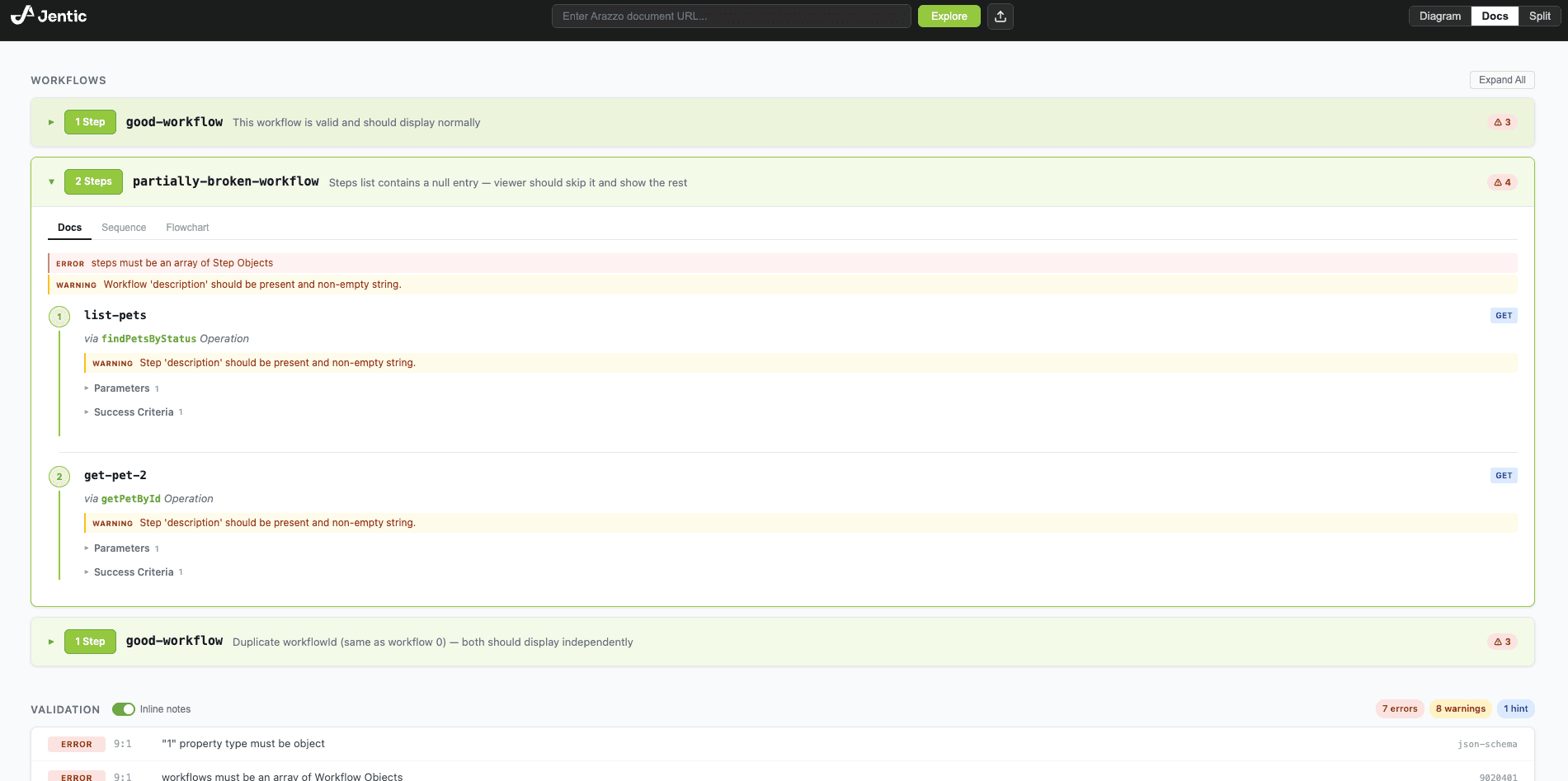
When a workflow represents a business process (a customer onboarding sequence, a payment authorization path, a fraud detection chain), the people reviewing it aren't always reading the raw YAML. They're reading the rendered document. Surfacing validation issues in that same view means reviewers and authors see the same picture. Problems don't hide in a separate validation report that only the person who ran the CLI saw. If validity is only known to the person who ran arazzo-validator locally, it isn't really part of the review process.
A toggle lets you show or hide the inline notes depending on whether you want a clean reading view or a diagnostic one. The full list in the Validation section is always present regardless.
A Richer View of Every Step
The viewer now shows considerably more operational detail per step.
HTTP method badges now appear next to each API call. A step invoking getPetById shows a GET badge. A step creating a resource shows POST. That sounds minor until you're reviewing a fifteen-step workflow and trying to distinguish read operations from write operations without cross-referencing the OpenAPI spec manually.
Steps that call other Arazzo workflows now show the Arazzo logo rather than being styled as API operations. A step executing a sub-workflow has different semantics from one calling an API endpoint, and the viewer now reflects that.
Request bodies are rendered inline in the docs view. Form-encoded requests appear as tables showing field names and values. JSON and YAML payloads render as code. For workflows involving POST, PUT, or PATCH operations, this means reviewers can see exactly what gets sent without opening the source document. The full payload is part of the workflow documentation, not an annotation pointing elsewhere.
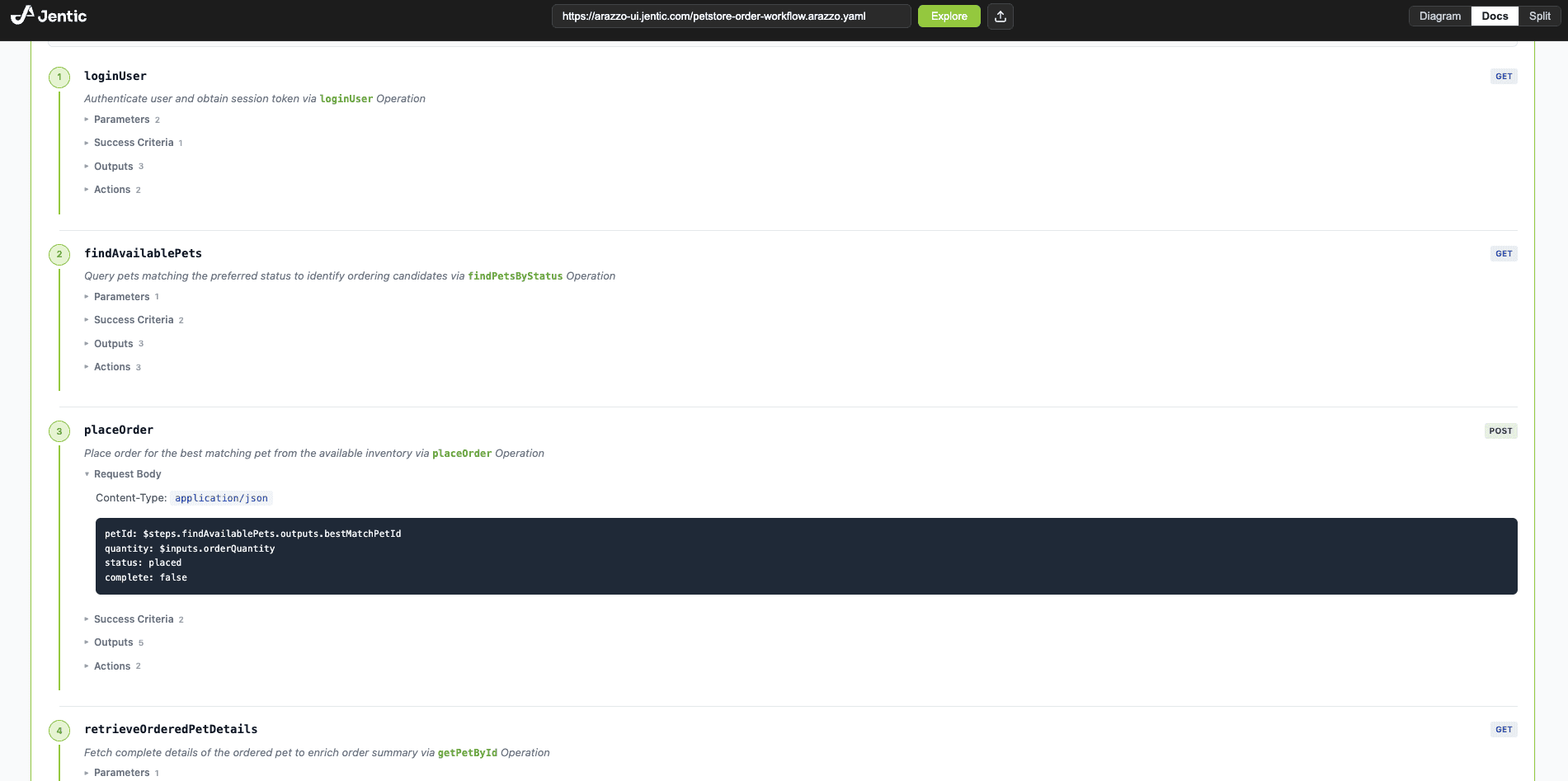
Together these changes close the gap between reading a workflow diagram and understanding what it actually does at the HTTP level.
Reliability
On fresh npm installs, the validator was silently reporting zero errors due to an ApiDOM version conflict that the lockfile had been masking. The fix involved upgrading our upstream SpecLynx packages from ApiDOM v5 to v7. This also brings stricter version checking: documents declaring an unsupported or future Arazzo version are now flagged rather than passed through silently. If you've been getting clean validation results and weren't expecting them, it's worth re-running against the updated package.
Try It
Arazzo UI is live at arazzo-ui.jentic.com. Load your own workflows or point it at any publicly accessible Arazzo document via the ?document= query parameter. Source and packages are on GitHub.
This release also flows downstream to the API and agent platforms that have built on Arazzo UI's open-source packages. If you're shipping tooling in that space, the validation and rendering improvements are available to you now.